Troubleshooting
Why an eWON LAN IP overlapping your PC's LAN blocks the PLC
Short answer
Yes: the eWON LAN address must fall inside the PLC's IP network under the configured subnet mask, and it must be unique there. But that network must not overlap any network your engineering PC already routes locally, because eCatcher then declines to install the competing VPN route: the eWON stays reachable while the PLC behind it does not.
On this page
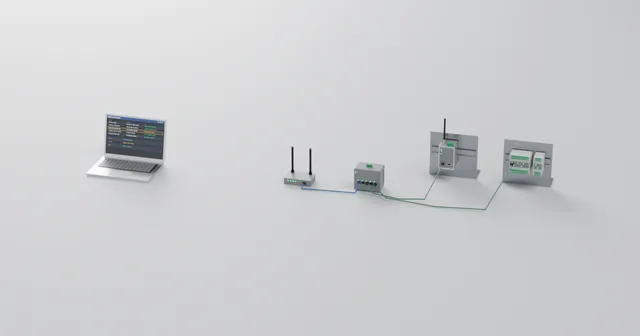
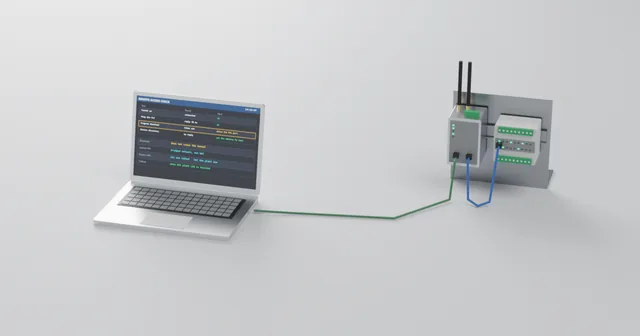
Yes, with one condition. The eWON LAN address has to sit in the same IP network as the PLC, judged by the subnet mask rather than by the look of the address. But that machine network must not overlap any network your engineering PC is already connected to, because eCatcher will not install a VPN route to a destination the PC already routes locally. The tunnel still comes up and the eWON answers on its VPN address while the PLC behind it stays dark. Below: the rule for each address, the arithmetic on a concrete example, and the order to fix it in.
What each address has to satisfy #
| Item | Requirement | Decision |
|---|---|---|
| PLC, machine side | its address and mask define the network | document both; everything else is derived from them |
| eWON LAN interface | same network as the PLC, address unused by any other device | assign a free address inside the PLC's network |
| eWON WAN interface | a different network from the eWON LAN | the unit is a router and rejects overlapping LAN and WAN subnets |
| Engineering PC adapters | no network overlapping the eWON LAN network | re-address one side before connecting |
The eWON is a router before it is a remote-access box: if its LAN and WAN interfaces land in one subnet it refuses the configuration with the error "LAN and WAN IP addresses configured are conflicting". That check runs inside the eWON and is separate from the PC-side conflict below.
Why the overlap hides the PLC #
eCatcher is the PC-side client that builds the VPN tunnel through the Talk2M service to the eWON. When the tunnel comes up, it normally adds a route on your PC that sends the eWON LAN network through the VPN adapter. Your PC keeps one preferred route per destination. If it already has a connected route to that same network, because its own Ethernet or Wi-Fi adapter lives there, eCatcher does not add a second route to the destination, so your existing communications keep working, and it reports an address conflict instead.
The symptom follows directly. The eWON's VPN address rides its own tunnel route, so the eWON answers. Packets for the PLC follow the older local route out of your ordinary adapter onto your own segment, where the PLC is not. "I can reach the eWON but nothing behind it" is the signature of this overlap. The same limit applies between remote sites: two eWONs whose LAN networks are identical cannot both have routes installed, so give every cell you support a different range.
The arithmetic on a worked example #
Take a PLC at 192.168.11.90 with mask 255.255.255.0.
- Its network is 192.168.11.90 AND 255.255.255.0 = 192.168.11.0, written 192.168.11.0/24 in CIDR notation. Hosts run from 192.168.11.1 to 192.168.11.254; the broadcast address is 192.168.11.255.
- An eWON LAN address of 192.168.11.10 with that mask gives 192.168.11.10 AND 255.255.255.0 = 192.168.11.0, the same network, correct, provided no other device holds that address.
- An eWON LAN address of 192.168.12.10 with that mask lands in 192.168.12.0/24, a different network, so the PLC is not directly reachable and the configuration is wrong.
Now the overlap test. If the engineering PC's adapter is 192.168.11.35 with the same mask, its connected network is also the machine network, identical to the destination eCatcher wants, and the VPN route is skipped. Containment counts as well: a PC network of 192.168.0.0/16, mask 255.255.0.0, spans 192.168.0.0 through 192.168.255.255 and contains the whole machine network, so it conflicts too. Overlap means any intersection, not only equality.
Decision for this example: one engineering PC against a machine cell, so move the PC's network, for example to 192.168.20.0/24, and leave the cell's addressing alone.
Remove the overlap in this order #
- Record the PLC address and mask, the eWON LAN address and mask, the eWON WAN address, and the address and mask of every active adapter on the PC: Ethernet, Wi-Fi, and any other VPN client already connected.
- Compute each network as address AND mask. Confirm the eWON LAN address falls inside the PLC's network and duplicates no device on it.
- Compare the eWON LAN network with each PC network. Identical, containing or contained: all three are the overlap.
- Change one side only, either the whole machine segment (PLC, eWON LAN, every device on it) or the local network the PC adapter sits on. Re-addressing a running cell drops its communications while devices are changed, so do that work in a planned stop.
- Disconnect and reconnect eCatcher so it re-evaluates the routes, and confirm the address-conflict warning no longer appears.
Verify the tunnel and the route separately #
Two results, tested in this order:
- Tunnel: ping the eWON's VPN address. If that fails, the fault is in the client or the tunnel rather than the addressing; work through why a VPN-connected Flexy gets an address but cannot be pinged.
- Route: confirm the PC's routing table now sends the machine network through the VPN adapter, then ping the PLC and open the programming session. If ping answers but the program download still fails, that is a different fault, covered in ping works but PLC program download fails over remote access.
Reaching the eWON alone proves nothing about the LAN behind it; only the second test closes the job.
Questions asked
Does the eWON LAN address have to start with 192.168.11?
Only when the PLC's mask is 255.255.255.0. With a wider mask the qualifying range widens: mask 255.255.252.0 puts a PLC at 192.168.11.90 into the network 192.168.8.0/22, so an eWON LAN address anywhere from 192.168.8.1 to 192.168.11.254 shares it. Read the mask off the PLC before choosing.
Which side do I re-address, the machine cell or my own network?
Pick the side with fewer devices that you are allowed to change. On a corporate office LAN shared by many users that is the machine cell, so plan the PLC, the eWON LAN and every device on that segment. At home or in a lab, moving your own network is the quicker job. Either way the two networks must end up distinct.
Can a second VPN on the same PC cause the same conflict?
Yes. Every active adapter counts, including a corporate VPN client or a virtual machine network. If one of them claims a range that overlaps the machine network, eCatcher leaves the route alone exactly as it does with a physical LAN adapter. Disconnect the other VPN, or have its range changed, before connecting.
Is the eWON's own LAN and WAN conflict the same fault?
No. That message comes from the eWON whatever the PC does: as a router it cannot run two interfaces in one subnet, so move the WAN address, normally the internet-facing side, into a different network. The eCatcher conflict is a routing decision on your PC, and one careless addressing plan can produce both.