Explainer
Why an OPC-HDA archive moves into Canary Historian by CSV or SQL
Short answer
Canary Historian has no OPC-HDA client among its collectors, so an archive that only speaks HDA cannot be pulled in directly. Export the recorded samples and load them with the CSV Collector, or read them through the SQL Collector where the source documents SQL access to its history, and prove timestamps, values and quality in a pilot before batching.
On this page
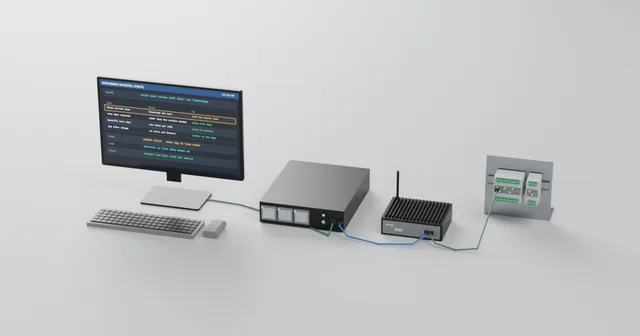
An archive whose only door is an OPC-HDA server cannot be pulled into Canary Historian by pointing a collector at it. Canary's collector set has no OPC-HDA client, so nothing in the lineup can issue the historical reads that server answers. The archive moves as a logical export instead: you export the recorded samples and feed them to the CSV Collector, or, where the source historian documents SQL access to its history, the SQL Collector reads them. Before either route runs at scale, a small pilot proves that sample times, values and quality survive the trip. Below: the route decision, what the export must carry, and the reconciliation arithmetic that tells you when to start batching.
The interface problem, stated plainly #
OPC-HDA is a retrieval interface, defined by the OPC Foundation's Historical Data Access specification. Every item it returns carries a timestamp, a value and a quality, and it offers different reads: raw reads hand back the samples actually stored, while processed reads hand back interpolated or aggregated values computed on request. The specification governs how history is read; it says nothing about the storage engine behind it. The same HDA server can sit on proprietary files or on a SQL database, so "the database is OPC-HDA at its core" tells you how to read it, not what to copy.
That resolves the three tempting shortcuts:
- Repointing a live-data collector at the HDA server gets you current values on a live interface; the stored archive never arrives, because that collector has no HDA read to ask for it.
- Copying the source's database files moves storage blocks in the source vendor's own format; no Canary collector can parse them.
- Retrying or reconfiguring the live connection changes nothing about either point.
What remains is the pair of routes Canary provides for exactly this shape: the CSV Collector consuming exported files, and the SQL Collector reading a database that exposes its history through SQL.
What the export must carry #
Migrate recorded samples, not trends. Four fields per row:
- Tag identity, stable from source to destination.
- The original source timestamp, with the archive's timezone convention written down: offset-carrying or plant-local.
- The value as stored, not reformatted for display.
- The quality as stored.
Ask the source for raw or recorded reads. An interpolated or averaged export manufactures samples the plant never stored and quietly erases the meaning of gaps. Where the source historian has no export tool of its own, a small HDA client script can pull the raw samples between two timestamps and write the CSV itself.
Timezone is where archives die. An archive in plant-local time contains ambiguous timestamps across the fall-back hour of daylight saving, and a mishandled offset lands every winter sample one hour off, as the one-hour winter shift in OPC HDA backfills shows. Put a DST transition inside the pilot range if the archive has one.
"Entire database" is also several objects: samples, tag names, descriptions and units, quality, annotations and configuration. List each object you require and mark which route carries it; the sample stream does not carry all of them.
CSV Collector or SQL Collector #
Default to the CSV Collector. The file is the transfer record: before anything loads, you open it and check the delimiter, header row, quoting, timestamp text, decimal separator and blank fields, and you count its rows; maintenance and vendor support can inspect the same file later. One spreadsheet caution: opening the export in a spreadsheet can silently reformat timestamps and round values, so the untouched export stays the record of what was transferred.
Choose the SQL Collector only when two things are documented, not assumed:
- The schema exposes tag identity, sample time, value and quality through read-only access, and the vendor documents that path.
- The collector can load a historical range under the original sample timestamps, which is backfill behavior, not live polling. A working SQL connection proves nothing about this. How Canary collectors accept late and out-of-order data decides whether an old range loads at all, which is why the pilot, not the connection, settles the question.
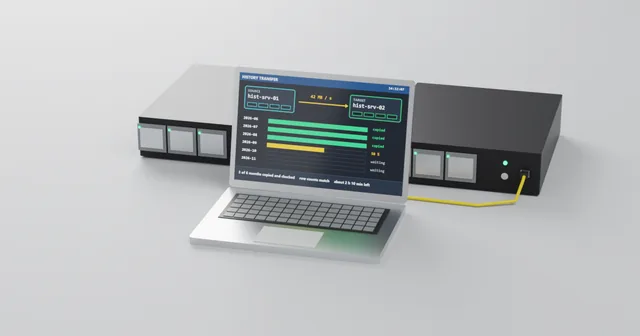
Worked example: reconciling a three-tag, one-day pilot at one-minute sampling #
An illustrative pilot. Copy the shape and substitute your counts.
Inputs:
- Tag group: 3 tags, a flow, a temperature and a pump state, covering a fast analog, a slow analog and a discrete.
- Time range: one day at the source's one recorded sample per minute, so 24 h x 60 min/h = 1440 possible sample times per tag.
- Source CSV export: 4298 rows. The export is the record of what the source actually stored.
- Rows landed in the isolated test destination: 4298.
The rule, in words: a faithful transfer lands exactly the recorded samples, so the imported count equals the export count, and spot checks match on time, value and quality. A count difference counts against you only if the source cannot explain it.
The arithmetic:
- A fully recorded day would hold 3 tags x 1440 samples = 4320 samples.
- The export holds 4298 rows, so the source itself stored 4320 - 4298 = 22 fewer samples than a gap-free day.
- Pull those 22 timestamps in the source trend: they sit in one window where the transmitter was out of service and the source stored nothing. Explained at the source, not a transfer loss.
- Imported minus exported: 4298 - 4298 = 0 unexplained rows.
- Spot check: 60 timestamps, 20 per tag, including both edges of that outage window and one bad-quality stretch, compared one by one. Result: 60 of 60 exact on time, value and quality.
Result: zero unexplained differences.
Decision, with its threshold: at zero unexplained differences, the route is accepted and batching starts. One unexplained difference, whether a shifted timestamp, a rounded value or a count that will not reconcile, stops the run until the mapping is fixed and the pilot repeated. An imported count above the export count is the worst outcome: the route is manufacturing records through interpolation or duplication, and it is rejected outright.
Batching the rest without gaps #
- Cut the archive into tag groups and time ranges sized from the pilot's measured throughput, not from a guessed universal batch number.
- Write down boundary ownership: whether each range includes its start and end timestamps. Check the samples exactly at adjacent boundaries so nothing is dropped or loaded twice.
- Keep a transfer ledger: tag group, requested range, export or query identifier, source row count, imported count and spot-check status, per batch.
- Keep the source archive readable, read-only, until the last batch is accepted. Operators keep their old trends through the work; that is continuity, not completion.
- When a batch lands wrong, read the destination's event properties before touching the mapping: troubleshooting Canary backfill failures from event properties is the diagnostic to run first.
- If the source stays live, fix a cutoff timestamp. After it, new history arrives through live collection, and one final bounded export closes the gap up to the cutoff. It is the same cutoff-and-reconcile discipline as backfilling PI from an existing plant historian.
When neither route reaches the records #
If the source documents neither a CSV export nor SQL access to its history, stop before building a converter from reverse-engineered storage files. Make two calls instead: the source historian's vendor, for a documented export method or confirmation that its HDA server answers raw reads you can script, and Canary's support, for a supported ingestion path for whatever file you can produce. An improvised reader has no vendor behind it the day it breaks, and what it mishandles is the plant's only copy of its own history.
Questions asked
Can an Ignition gateway act as the missing HDA client?
Yes, as the extraction step. Ignition's system.opchda.readRaw scripting function reads raw recorded values from an OPC-HDA server between two timestamps, and a gateway script can write those rows to a CSV laid out for the CSV Collector. The gateway is then only the exporter; the pilot reconciliation still decides whether the route is faithful.
How long will the whole migration take?
Measure it, then extrapolate. Time the pilot's export and its import separately, divide the pilot's sample count by each duration to get a throughput in samples per hour, and divide the archive's total sample count by the slower of the two rates. Add the reconciliation time per batch you observed in the pilot. The estimate then comes from your own numbers, not a rule of thumb.
Do tag descriptions, units and limits migrate with the samples?
Not through the sample stream. The CSV and SQL routes carry tag identity, timestamp, value and quality. Descriptions, engineering units, display ranges and alarm limits are separate configuration objects: rebuild them in the destination's tag configuration or import them with its documented tools, or the trends will arrive bare.
What happens if a batch is loaded twice by accident?
Find out deliberately, in the pilot, not in production. Import one pilot range a second time and record whether the destination rejects, replaces or duplicates the rows. Put that behavior in the ledger and make reruns conditional on it: a replacing store makes retries safe; a duplicating store means every rerun needs the range cleared first.